Bagaimana konten ini?
- Pelajari
- Buktikan, Bagian 3: Panduan Langkah demi Langkah untuk Implementasi Penalaran Otomatis
Buktikan, Bagian 3: Panduan Langkah demi Langkah untuk Implementasi Penalaran Otomatis

Dalam panduan ini, Anda akan mempelajari cara membuat kebijakan penalaran otomatis dari dokumen bisnis yang ada, melakukan deployment melalui Batas Pengaman Amazon Bedrock, memvalidasi respons LLM dengan ApplyGuardrail, membangun jejak audit, dan mengamankan agen AI dengan Kebijakan AgentCore. Menggunakan proses ini, tim dapat beralih dari dokumen kepatuhan ke verifikasi produksi hanya dalam waktu 30 menit.

Di Bagian 1 (“Mengapa 'Mungkin Benar' Tidak Cukup Baik”) kami membahas mengapa startups membutuhkan verifikasi deterministik. Di Bagian 2 (“Logika Formal, Kebijakan Cedar, dan Ekonomi Verifikasi”) kami menjelaskan jalur verifikasi dan matematika di baliknya. Kini, saatnya untuk membangun.
Apa saja yang Anda butuhkan sebelum memulai?
Sebelum Anda mulai, pastikan Anda memiliki hal berikut:
- Akun AWS dengan akses Amazon Bedrock. Jika Anda adalah bagian dari AWS Activate, Anda sudah memiliki kredit untuk ini.
- Python 3.9+ dengan boto3. Jika Anda mengirimkan MVP, Anda memiliki ini.
- Dokumen kebijakan (PDF, Markdown, atau teks biasa) yang menjelaskan aturan bisnis Anda. Jika Anda telah lulus peninjauan kepatuhan atau uji tuntas investor, Anda memiliki ini.
Langkah 1: Buat kebijakan AR Anda
Jalur tercepat adalah melalui Konsol AWS. Anda tidak perlu menulis logika formal, karena Bedrock menerjemahkan dokumen sumber Anda ke dalam aturan logika formal secara otomatis.
- Buka konsol Bedrock dan navigasikan ke Penalaran Otomatis di bilah sisi kiri.
- Buat kebijakan baru. Berikan nama deskriptif (misalnya, kebijakan kelayakan hipotek).
- Unggah dokumen sumber Anda. Ini adalah file PDF, Word doc, atau teks biasa yang menjelaskan aturan bisnis Anda. Bagi startup fintech, ini mungkin dokumen kriteria pinjaman Anda. Untuk layanan kesehatan, protokol klinis Anda.
- Berikan instruksi. Tulis tujuan singkat yang menjelaskan apa yang divalidasi kebijakan, dan sertakan 2–3 contoh pasangan tanya jawab. Ini membantu sistem memahami bagaimana pengguna akan berinteraksi dengan kebijakan.
Bagi tim yang memilih untuk tidak menggunakan konsol, tersedia juga antarmuka percakapan untuk pembuatan kebijakan yang memandu Anda melalui formalisasi dalam bahasa alami. Antarmuka ini memiliki beberapa prasyarat (termasuk Kiro-CLI) tetapi sepenuhnya menghilangkan konsol dari alur kerja.
Contoh tujuan:
Kebijakan ini memvalidasi pertanyaan kelayakan hipotek. Pengguna bertanya tentang apakah pelanggan memenuhi syarat untuk jenis hipotek tertentu berdasarkan detail keuangan mereka.
Contoh Tanya Jawab:
T: Seorang pelanggan ingin membeli rumah seharga 350.000 USD dengan uang muka 30.000 USD. Apakah mereka memenuhi syarat untuk hipotek konvensional?
J: Tidak. Hipotek konvensional memerlukan uang muka minimum 20 persen (70.000 USD untuk pembelian 350.000 USD).
Tinjau laporan fidelitas:
Setelah sistem memproses dokumen Anda, sistem akan menghasilkan laporan fidelitas dengan dua skor:
- Skor cakupan (0,0 hingga 1,0): berapa banyak dokumen sumber Anda terwakili dalam kebijakan
- Skor akurasi (0,0 hingga 1,0): seberapa tepat aturan yang diekstrak cocok dengan tujuan dokumen Anda
Laporan ini juga menunjukkan variabel dan aturan spesifik yang diekstrak, dengan landasan kembali ke pernyataan yang tepat dalam dokumen sumber Anda. Di sinilah Anda memeriksa apakah sistem memahami aturan Anda dengan benar.
Perbaiki deskripsi variabel Anda menggunakan contoh nyata dari aplikasi Anda. Uji pertanyaan yang representatif, periksa bagaimana sistem menerjemahkannya, dan tingkatkan deskripsi di mana pun terjemahan gagal. Ini adalah pengungkit terbesar untuk akurasi. Sertakan unit, sinonim, aturan konversi, dan terminologi khusus domain jika memungkinkan. Deskripsi seperti “Uang muka peminjam sebagai persentase dari harga pembelian; ketika pengguna menyebutkan jumlah dolar, konversikan menggunakan (downPayment/purchasePrice) * 100" mengungguli “Berapa banyak uang muka yang diberikan oleh peminjam."
Ini bukan upaya rekayasa multi-sprint. Hanya butuh waktu 30 menit dari dokumen kepatuhan Anda yang ada hingga kebijakan AR yang berfungsi. Lakukan iterasi deskripsi variabel dan uji dengan contoh pertanyaan sampai skor fidelitas dan hasil uji sesuai dengan harapan Anda.
Untuk jalur API (berguna untuk jalur CI/CD), lihat referensi API CreateAutomatedReasoningPolicy. API mengambil nama, deskripsi opsional, dan policyDefinition yang berisi aturan, variabel, dan tipe kustom.
Langkah 2: Lakukan deployment ke batasan pengaman
Setelah kebijakan Anda diuji dengan baik, lakukan deployment untuk penggunaan produksi.
Simpan versi yang tidak dapat diubah. Di konsol, pilih "Simpan sebagai versi baru." Ini membuat snapshot bernomor dan tidak dapat diubah (versi 1, 2, 3 ...) agar batasan pengaman produksi Anda tidak terpengaruh ketika Anda terus mengedit DRAF. Beginilah cara startups melakukan pengiriman secara aman dengan cepat: tim kepatuhan Anda meninjau versi 1 dalam produksi sementara tim rekayasa Anda melakukan iterasi versi 2 dalam draf. Tidak ada deployment yang diam, tidak ada “mohon jangan sentuh kebijakan sampai kami mengirim."
Setelah Anda memublikasikan versi kebijakan Anda, lampirkan ke batasan pengaman agar dapat digunakan selama validasi runtime:
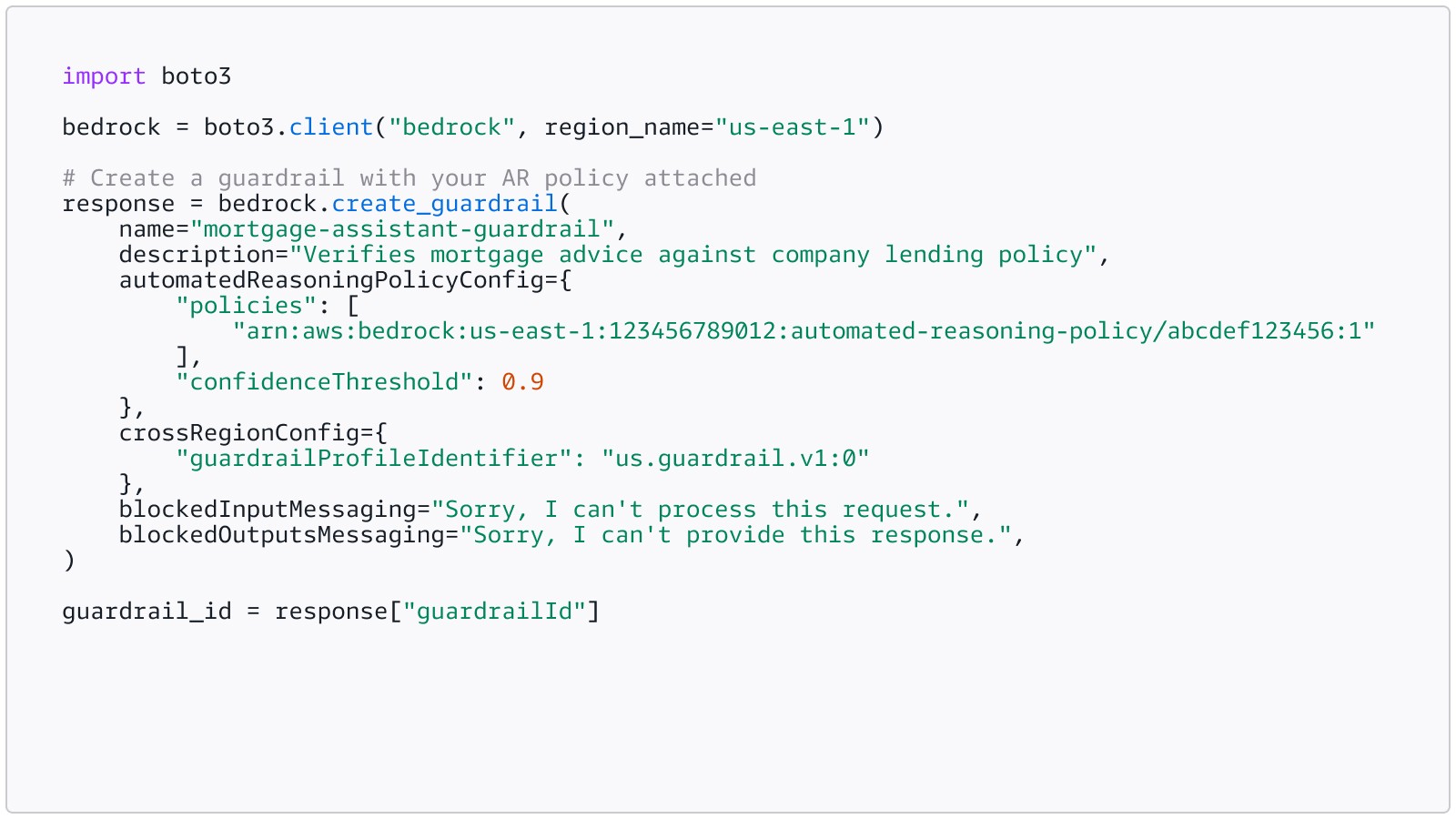
Detail kunci:
- kebijakan mengambil array string ARN kebijakan (maksimum 2), bukan objek
- confidenceThreshold (opsional, 0,0 hingga 1,0) mengontrol tingkat perjanjian minimum agar terjemahan dianggap dapat diandalkan. Nilai yang lebih rendah (0,3) memunculkan lebih banyak temuan lebih cepat; nilai yang lebih tinggi (1,0) dioptimalkan secara ketat untuk kesempurnaan. Mulai dengan nilai rendah selama pengembangan, perketat untuk produksi
- crossRegionConfig wajib diisi untuk pemeriksaan AR; ini memungkinkan inferensi lintas wilayah untuk evaluasi batasan pengaman. Gunakan profil untuk geografi Anda (misalnya, us.guardrail.v1:0 untuk AS, eu.guardrail.v1:0 untuk UE)
- blockedInputMessaging dan blockedOutputsMessaging wajib diisi; ini adalah pesan cadangan yang ditampilkan ketika komponen batasan pengaman lain (bukan AR) memblokir konten
- Gunakan versi bernomor (:1) di ARN untuk produksi. Memesan DRAF hanya untuk pengembangan
Langkah 3: Validasikan respons LLM dengan ApplyGuardrail
Pola integrasi yang direkomendasikan adalah API mandiri ApplyGuardrail. Ini memberi Anda kontrol penuh atas konten apa yang divalidasi dan kapan, serta hal ini merupakan pendekatan yang direkomendasikan oleh dokumentasi AWS secara eksplisit untuk pemeriksaan AR.
Berikut adalah contoh integrasi minimal yang ditambahkan ke jalur inferensi Anda yang ada:
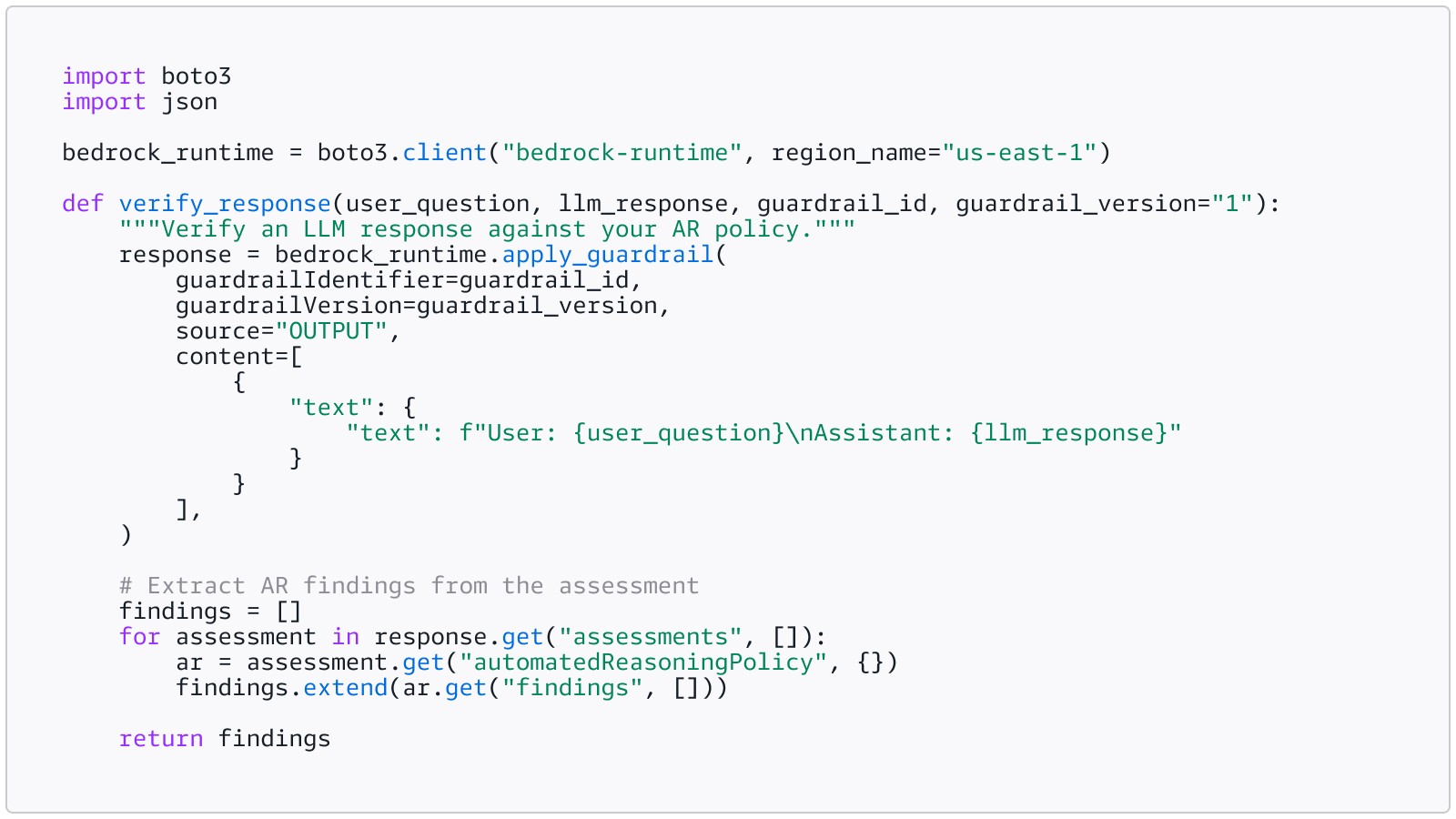
Panggil ini setelah LLM Anda menghasilkan respons, sebelum Anda menyajikannya kepada pengguna:
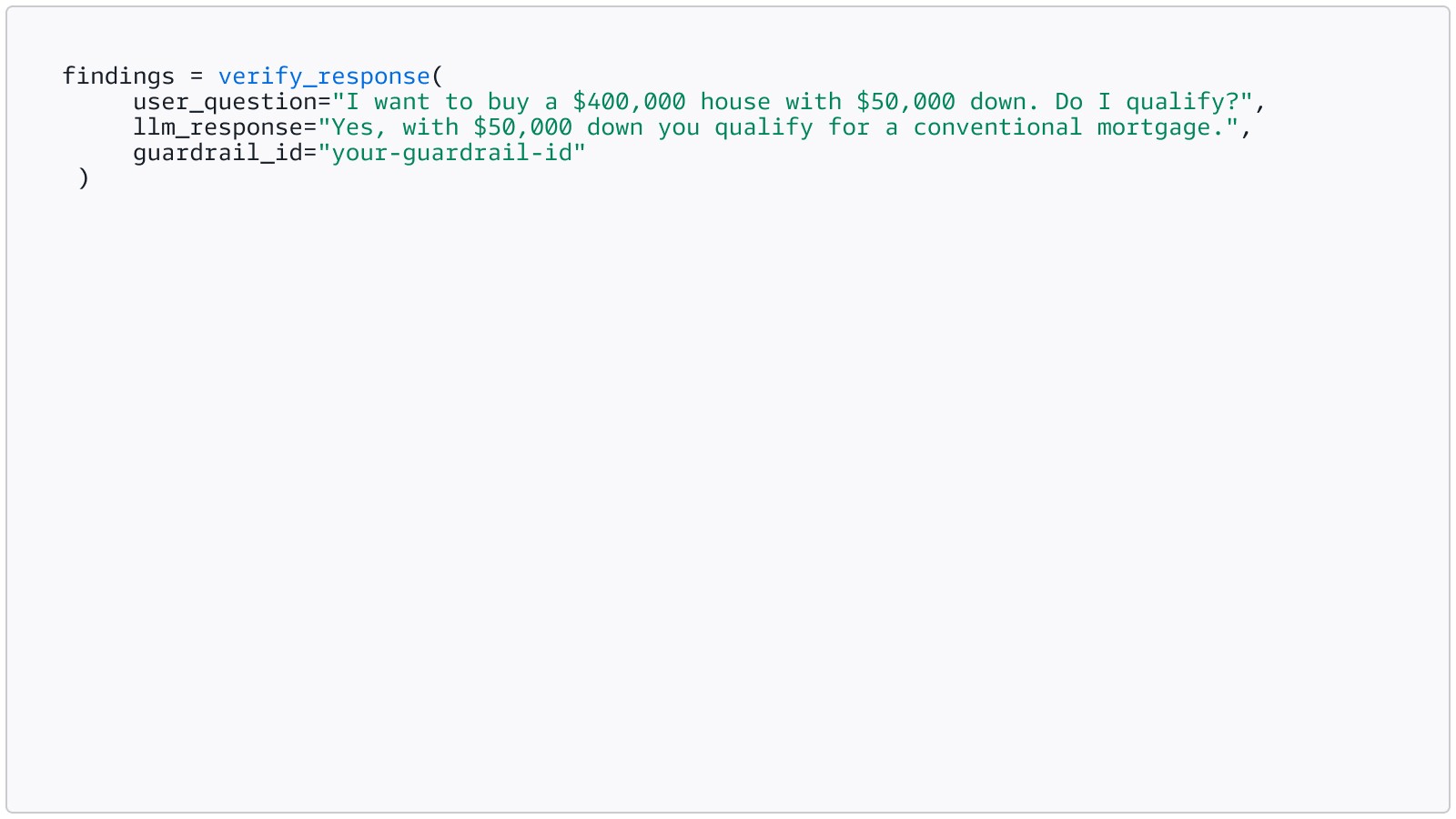
Penting: Pemeriksaan AR beroperasi dalam mode deteksi. Mereka mengembalikan temuan dan umpan balik. Mereka tidak memblokir atau menulis ulang respons secara otomatis. Aplikasi Anda memeriksa temuan dan memutuskan apa yang harus dilakukan.
Langkah 4: Tangani temuan
Setiap temuan merupakan tipe gabungan dengan tepat satu kunci ada. Berikut cara mengurainya dan bertindak:
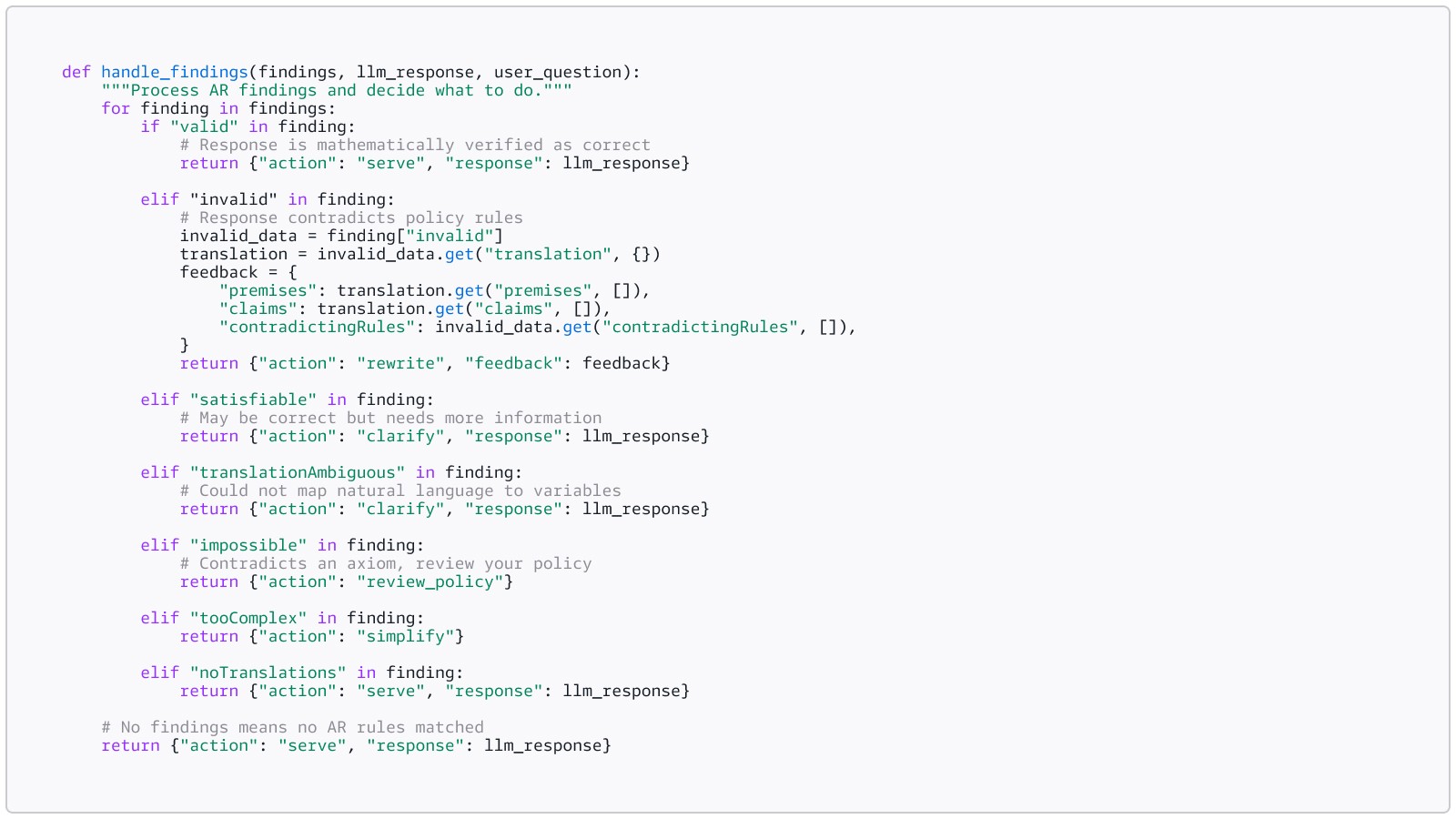
Pola remediasi standar adalah putaran penulisan ulang validasi: memvalidasi respons, umpan setiap pelanggaran kembali ke model, meregenerasi jawaban, dan memvalidasi ulang. Ulangi sampai respons valid atau batas percobaan lagi tercapai.
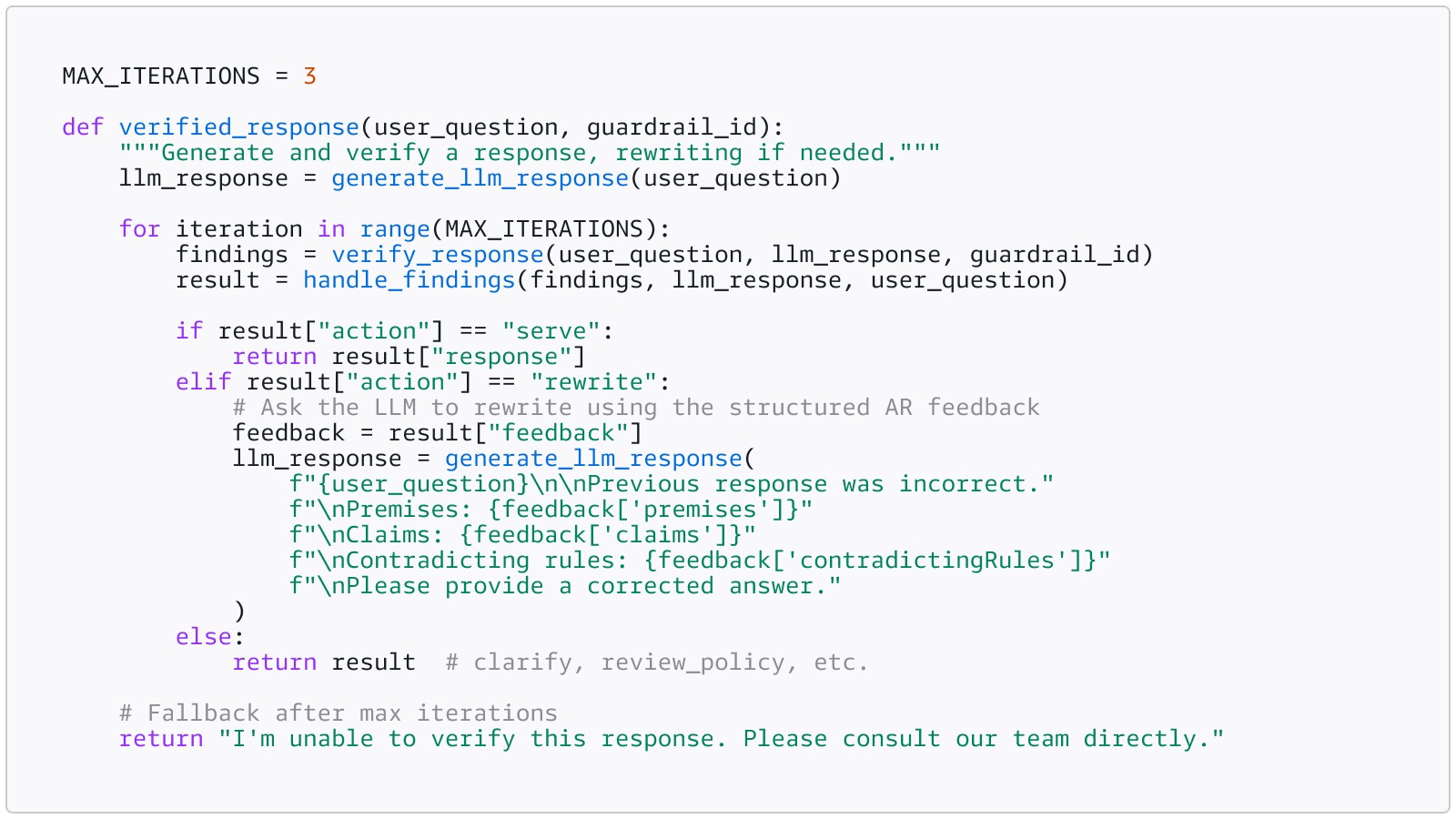
Pengguna Anda tidak pernah melihat putaran penulisan ulang. Mereka melihat jawaban yang benar pada percobaan pertama. Iterasi terjadi dalam milidetik di belakang layar.
Langkah 5: Bangun jejak audit
Setiap iterasi verifikasi harus dicatat. Ketika pelanggan korporasi Anda meminta bukti SOC 2, atau regulator Anda bertanya bagaimana Anda memverifikasi keputusan tertentu, Anda menarik log JSON. Setiap verifikasi diberi stempel waktu dan dapat dilacak.
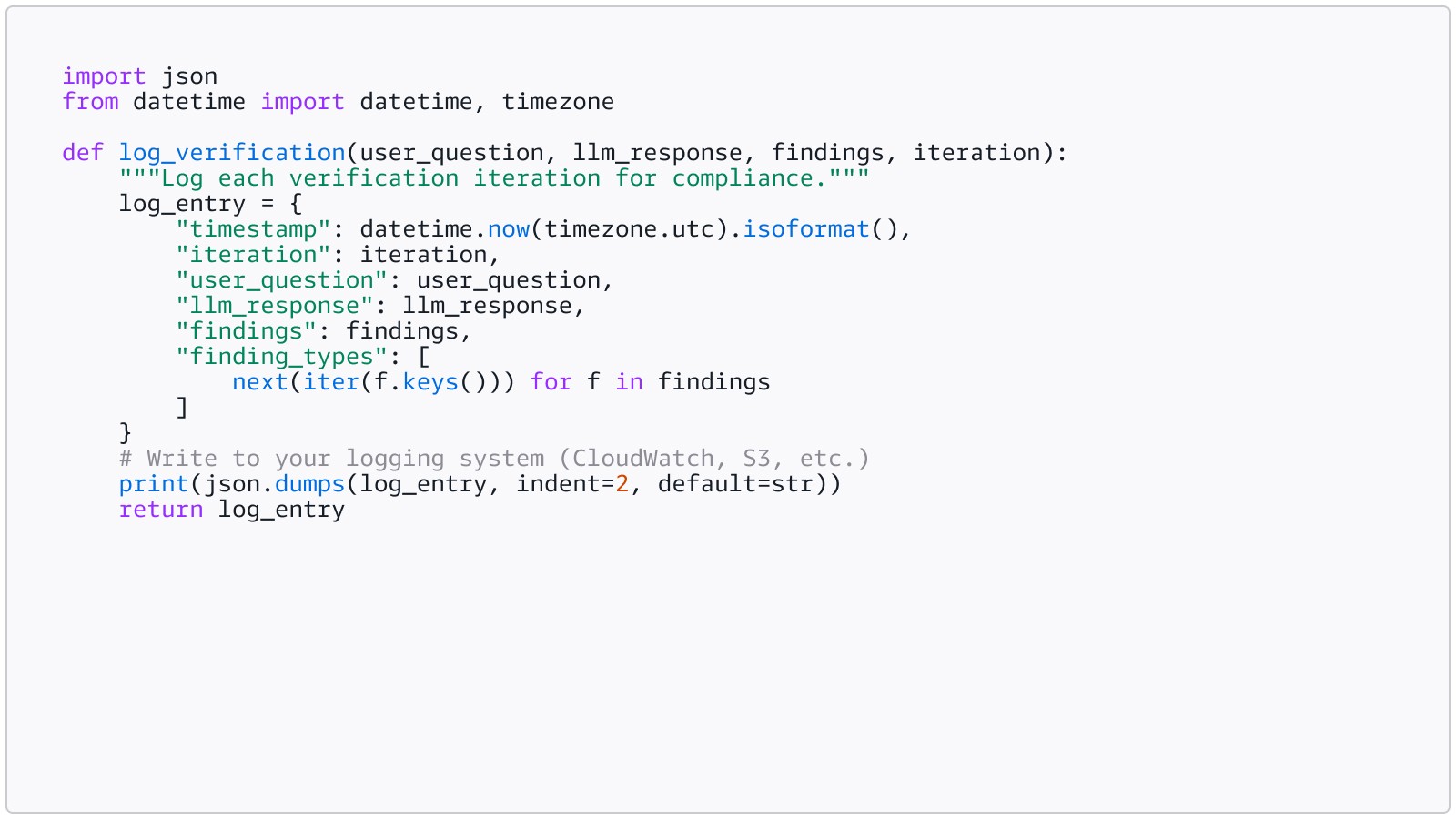
Log ini menjadi artefak kepatuhan Anda. Ini menunjukkan apa yang diminta pengguna, apa yang dihasilkan LLM, apa yang ditemukan AR, dan tindakan apa yang diambil oleh aplikasi Anda. Bagi startups yang mengejar SOC 2, kepatuhan HIPAA, atau penjualan korporasi, jejak audit ini tidak opsional. Hal ini adalah bukti bahwa sistem Anda bekerja seperti yang didokumentasikan.
Langkah 6: Amankan agen Anda dengan Kebijakan AgentCore
Jika startup Anda telah bergerak melampaui chatbot ke alur kerja agen (AI Anda memesan janji temu, memproses pengembalian uang, melakukan kueri basis data, atau mengirim email), Anda membutuhkan batasan pada apa yang dapat dilakukan agen Anda, bukan hanya apa yang dikatakannya.
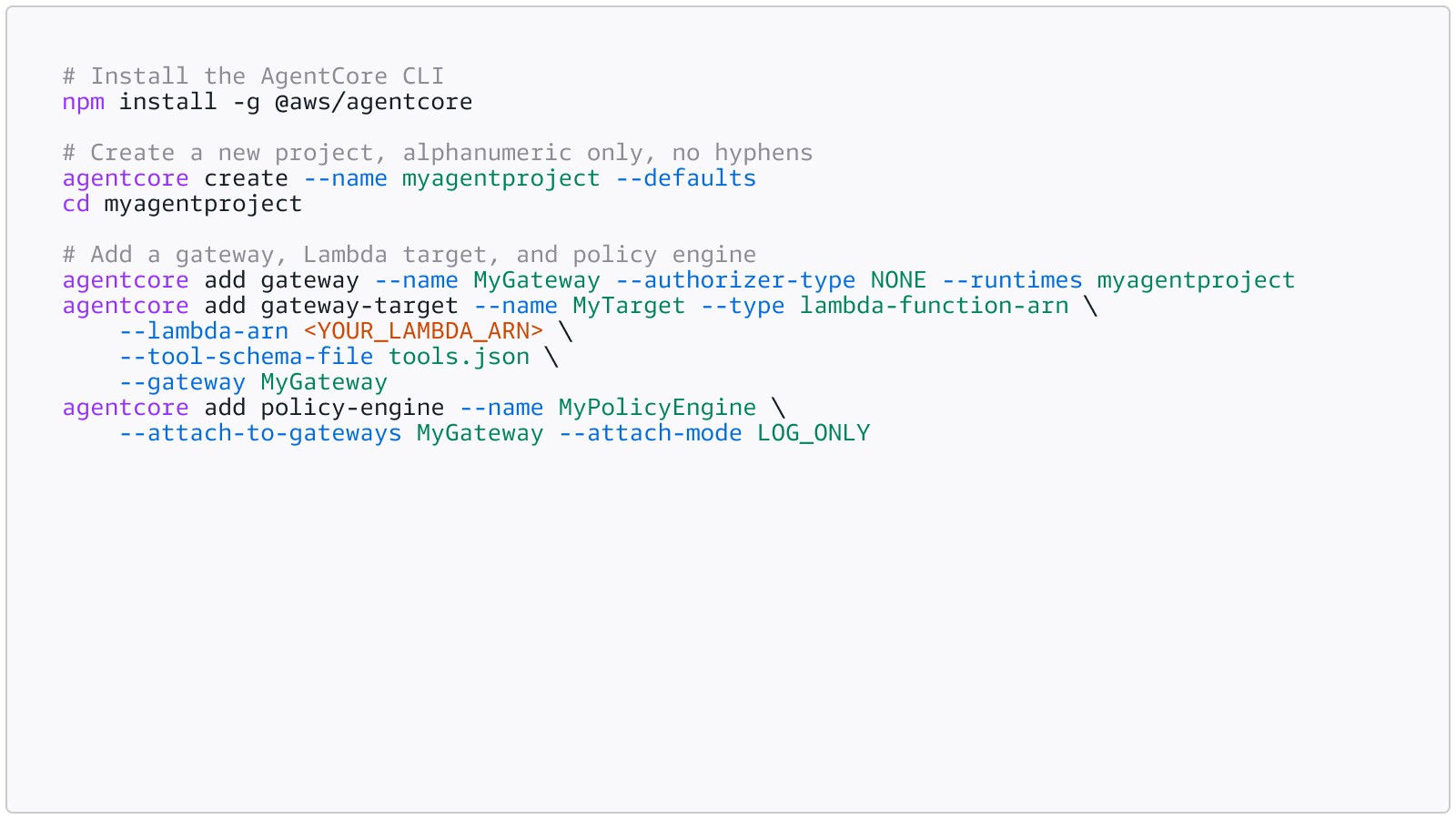
Kebijakan di Amazon Bedrock AgentCore menggunakan Cedar untuk menentukan batas-batas ini. Misalnya, agen penjadwalan janji temu layanan kesehatan membutuhkan kebijakan yang membatasi catatan pasien mana yang dapat diakses, membatasi tindakan penjadwalan hingga jam kerja, dan mencegahnya memproses pengembalian dana di atas ambang tanpa persetujuan manajer. Mulai dalam mode LOG_ONLY untuk mengamati apa yang dilakukan agen Anda tanpa memblokir apa pun. Setelah Anda memercayai kebijakan, beralih ke mode ENFORCE untuk produksi.
Gateway adalah lapisan penegakan antara agen Anda dan alatnya. Setiap invokasi alat melewati Gateway, kebijakan Cedar dievaluasi sebelum permintaan mencapai target. Inilah yang membuat penegakan menjadi deterministik dan independen dari penalaran agen: agen tidak dapat melewati, mengabaikan, atau berbicara melewati Gateway.
Siapkan Gateway dan Mesin Kebijakan menggunakan AgentCore CLI:
Tulis kebijakan Cedar dan lampirkan ke mesin kebijakan. Contoh berikut menunjukkan kebijakan ilustratif untuk agen janji temu layanan kesehatan. Dalam praktiknya, nama tindakan Anda dibuat secara otomatis dari target gateway dan skema alat Anda (misalnya, HealthTarget__get_patient_record), serta sumber daya harus mereferensikan ARN gateway spesifik Anda:
Cedar adalah default-tolak: setiap interaksi agen-alat diblokir kecuali kebijakan izin eksplisit mengizinkannya. Kebijakan izin Anda menentukan alat mana yang dapat dihubungi agen dan dalam kondisi apa. Kebijakan pelarangan di bawah ini memberikan pengecualian, memblokir skenario tertentu bahkan ketika izin yang lebih luas mengizinkannya.
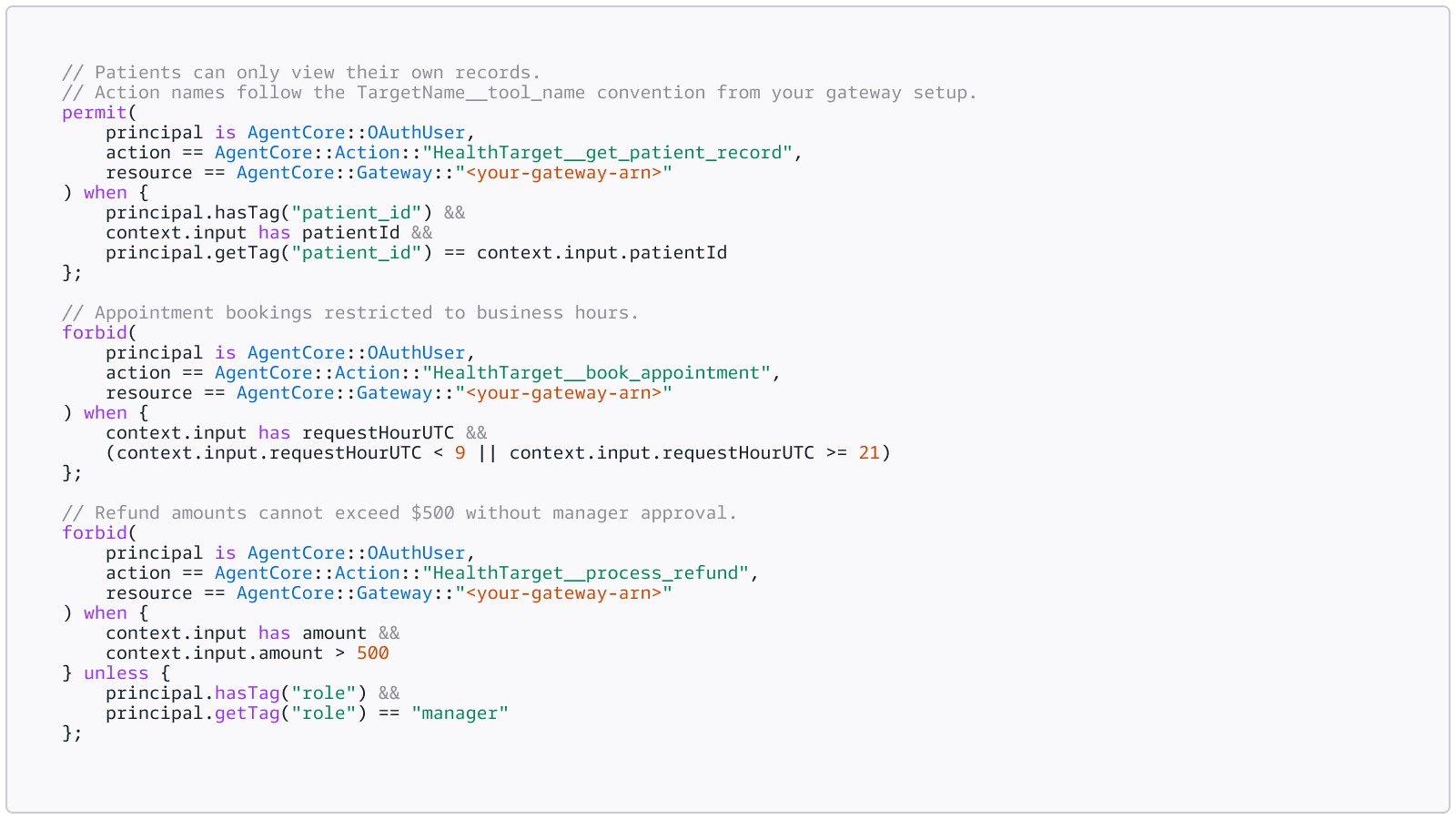
Simpan ini sebagai healthcare_policy.cedar, lalu lampirkan ke mesin kebijakan:
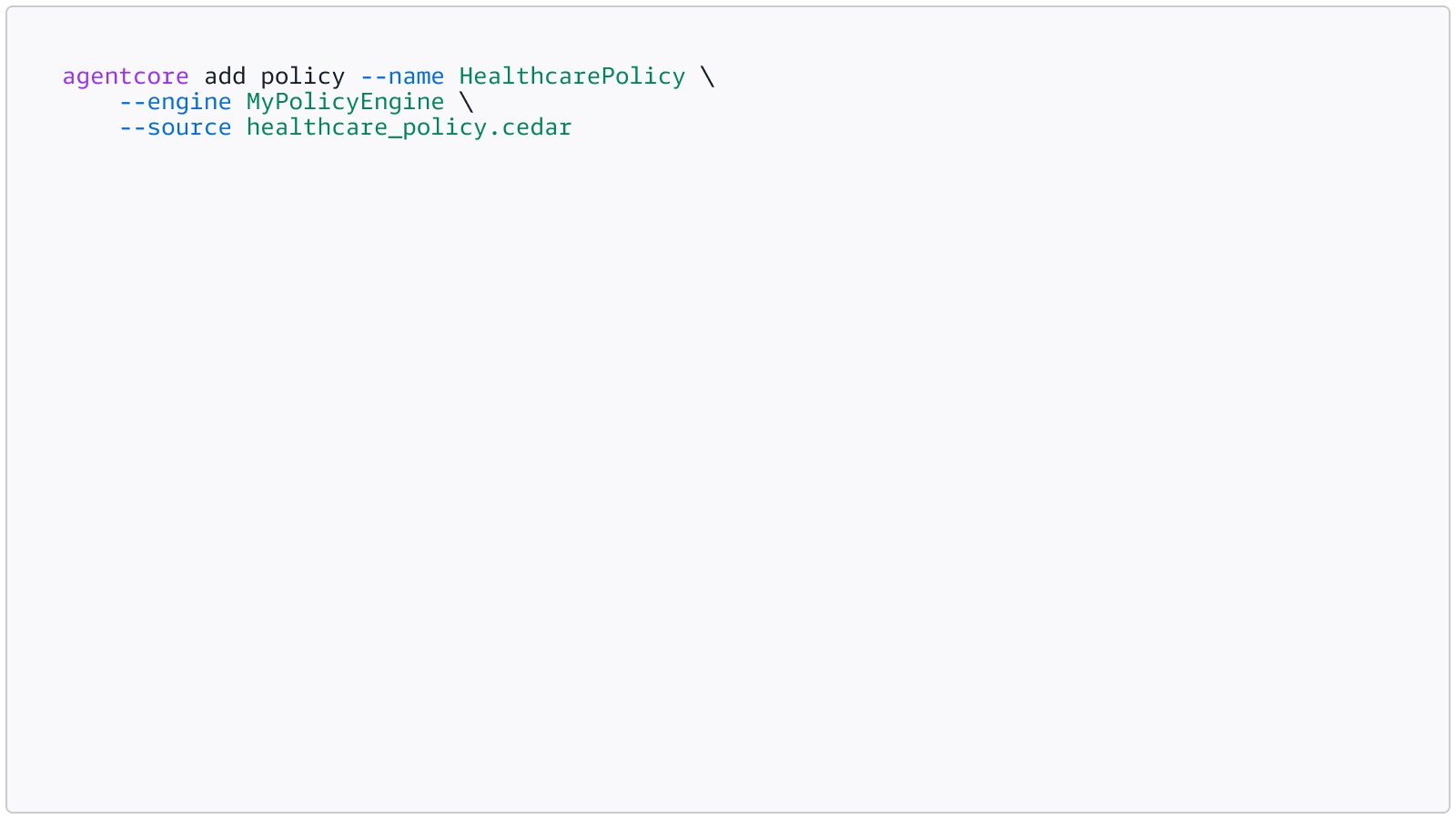
Alternatifnya, Anda dapat menjelaskan aturan Anda dalam bahasa alami dan membiarkan sistem menghasilkan Cedar untuk Anda (mengharuskan gateway di-deploy terlebih dahulu):
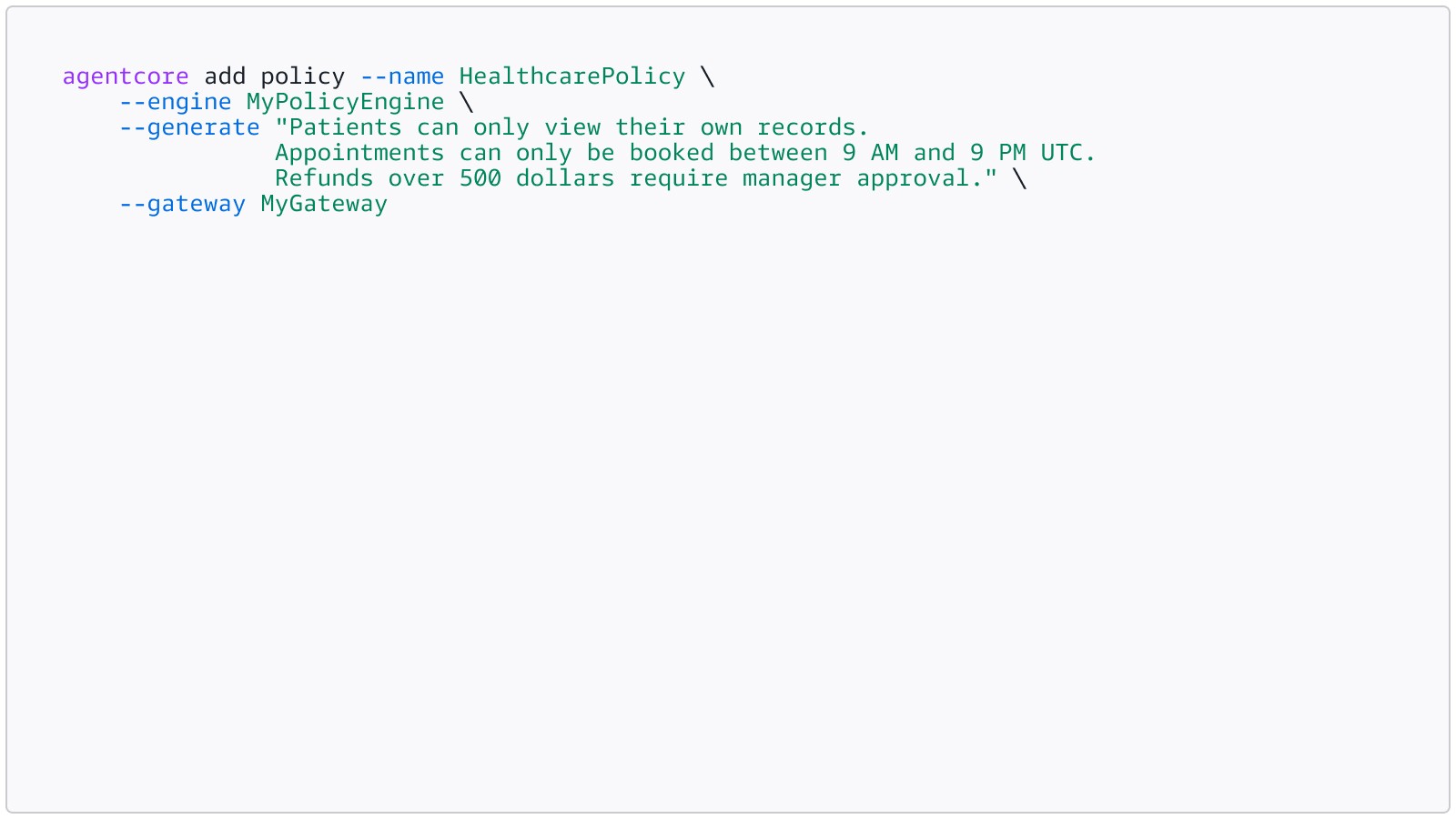
Penalaran otomatis memvalidasi kebijakan pada waktu penulisan, mendeteksi aturan yang terlalu permisif, terlalu membatasi, atau tidak efektif sebelum deployment.
Properti utama yang penting bagi startups yang diatur:
- Default-tolak: jika tidak ada kebijakan yang secara eksplisit mengizinkan tindakan, tindakan tersebut diblokir
- Larangan selalu menang: aturan hard-stop tidak dapat digantikan oleh kebijakan lain
- Penegakan deterministik: beroperasi di batas gateway, di luar penalaran agen Anda. Tidak dapat dilewati dengan injeksi prompt, halusinasi, atau bug
Mulai dalam mode LOG_ONLY untuk melihat apa yang dilakukan agen Anda tanpa merusak produk Anda. Log menunjukkan kebijakan mana yang diberlakukan pada setiap permintaan ke gateway, hasil keputusan kebijakan (izin atau tolak), dan memunculkan kebijakan yang tidak cocok saat terjadi pergeseran alat. Tinjau mereka. Perbaiki kebijakan. Jika Anda yakin, beralih ke ENFORCE. Ini adalah cara Anda beralih dari prototipe ke produksi tanpa mengganggu pengguna Anda.
Untuk contoh lengkap termasuk skrip deployment dan harness uji, lihat contoh Amazon Bedrock AgentCore di GitHub.
Apa yang terjadi setelah Anda melakukan deployment penalaran otomatis?
Setelah Anda menjalankan pemeriksaan AR dan Kebijakan AgentCore, Anda membuka sesuatu yang lebih berharga daripada pencegahan kesalahan: satu sumber kebenaran.
Kebijakan AR Anda adalah aturan bisnis Anda yang dienkode sebagai logika formal. Ketika aturan tersebut berubah (dan selalu terjadi: peraturan baru, kriteria pinjaman yang diperbarui, protokol klinis yang direvisi), Anda memperbarui dokumen sumber, meregenerasi kebijakan, dan segera setiap sistem AI di tumpukan Anda mematuhi aturan baru. Tidak ada rekayasa prompt untuk memperbarui. Tidak ada pelatihan ulang model. Tidak berharap seseorang ingat untuk mengubah prompt sistem.
Ini menghilangkan seluruh kelas bug pergeseran. Dokumentasi Anda dan perilaku AI Anda tertaut secara matematis. Keduanya tidak mungkin tidak sinkron.
Karena batasan pengaman bersifat agnostik model, lapisan verifikasi Anda tetap sama saat Anda beralih model fondasi. Kebijakan AR yang sama yang memverifikasi respons Claude juga memverifikasi Amazon Nova. Aturannya bergantung pada logika bisnis Anda, bukan modelnya.
Integrasi meluas ke seluruh ekosistem Bedrock: Kebijakan AR bekerja dengan Basis Pengetahuan untuk retrieval-augmented generation, dengan agen AgentCore untuk alur kerja multilangkah, dan dengan berbagai model fondasi. Anda membangun di atas platform, bukan solusi khusus.
Pelajari selengkapnya
- Dokumentasi pemeriksaan Penalaran Otomatis
- Konsep AR (variabel, aturan, temuan)
- Panduan integrasi (pola ApplyGuardrail)
- Dokumentasi Kebijakan AgentCore
- Contoh AgentCore di GitHub
- Gambaran Umum Keamanan yang Dapat Dibuktikan AWS
- Apa itu Penalaran Otomatis
- Bahasa Cedar (CNCF)
Demikianlah rangkaian artikel kami tentang AR untuk startup
Sepanjang seri Buktikan, tesis kami sama: startups yang membangun AI membutuhkan verifikasi matematis deterministik, bukan hanya perlindungan probabilistik.
Di Bagian 1, kami membahas mengapa masalah kepercayaan sangat penting bagi startups dan bagaimana kerja keras AWS selama beberapa dekade dalam metode formal menghasilkan Batasan Pengaman Bedrock dan Kebijakan AgentCore.
Di Bagian 2, kami melihat lebih detail tentang logika formal, jalur verifikasi, dan ekonomi. Dalam posting ini, Anda melihat jalur implementasi lengkap dari dokumen kepatuhan yang ada hingga AI terverifikasi yang siap produksi.
Startups yang sukses di era AI tidak hanya akan membangun sistem cerdas; mereka akan membangun sistem yang dapat mereka buktikan kebenarannya. Penalaran otomatis dan Kebijakan AgentCore memungkinkan hal itu saat ini, menggunakan kebijakan dan dokumen kepatuhan yang sudah dimiliki sebagian besar perusahaan. Satu-satunya pertanyaan yang tersisa adalah: apakah Anda akan memulai sekarang atau setelah insiden pertama memaksa Anda untuk bertindak?
.jpg)
Harshvardhan Chunawala
Harshvardhan Chunawala adalah Solutions Architect di AWS dan AWS Academy Authorized Educator, yang berbasis di Amerika Serikat. Beliau berpartner dengan para pimpinan korporasi besar, pendiri startup, dan eksekutif C-suite di seluruh dunia untuk merancang infrastruktur cloud yang dapat diskalakan serta aman di AWS di seluruh industri. Beliau adalah penerima penghargaan AWS Golden Jacket dan berkolaborasi di berbagai tim Amazon untuk membentuk dan memberikan kemampuan cloud terdepan di bidang keamanan, satelit, serta layanan AI agentik yang tepercaya. Di luar pekerjaannya di AWS, beliau adalah seorang teknolog dan ahli keamanan cloud yang diakui secara global dengan pengalaman lebih dari satu dekade. Beliau juga berafiliasi dengan Carnegie Mellon University, tempat beliau berkontribusi pada penelitian dan bimbingan dalam komputasi cloud serta teknologi baru. Jauh dari keyboard, beliau menikmati olahraga terjun payung dan menerbangkan pesawat.

Mike Miller
Mike Miller adalah Director of AI Product Management di AWS, tempat beliau memberikan nasihat tentang inisiatif AI generatif utama, termasuk kemampuan penalaran otomatis untuk mencegah halusinasi, Amazon Q, dan Amazon Bedrock. Beliau memberikan PartyRock, playground no-code untuk membangun aplikasi AI generatif, ke publik setelah versi internalnya menjadi viral di kalangan karyawan Amazon. Sebelumnya, Mike memimpin tim Thought Leadership AWS Machine Learning, tempat beliau meluncurkan AWS DeepLens, AWS DeepRacer, dan AWS DeepComposer, menempatkan machine learning langsung ke tangan para developer di seluruh dunia dengan cara yang menyenangkan serta menarik. Mike telah bekerja di Amazon selama lebih dari 13 tahun, sebelumnya memimpin manajemen produk untuk Fire TV di Lab126 sebelum bergabung bersama AWS.
Rahul Kumar
Dr. Rahul Kumar adalah Senior Applied Science Manager di AWS, tempat beliau memimpin upaya untuk membangun teknologi verifikasi untuk program Rust dan C serta memajukan AI neuro-simbolik yang menggabungkan model bahasa besar dengan penalaran otomatis. Di AWS, Rahul mendorong inisiatif sumber terbuka termasuk pemeriksa model Kani dan tantangan “Verifikasikan Keamanan Pustaka Standar Rust”. Beliau memegang gelar PhD dari Universitas Brigham Young serta sebelumnya bekerja di bidang verifikasi formal dan analisis statis di Microsoft Research, NASA JPL dan Dosen di Caltech. Beliau adalah pendukung setia untuk memberikan penalaran otomatis ke khalayak yang lebih luas, berbicara tentang bagaimana teknik pembuktian matematis dapat menghilangkan halusinasi AI serta menjamin kebenaran perangkat lunak. Beliau berdomisili di Seattle, Washington.

Stefano Buliani
Stefano Buliani adalah Principal Product Manager di Automated Reasoning Group di AWS, tempat beliau memimpin upaya untuk memberikan kemampuan verifikasi formal ke AI generatif melalui Batas Pengaman Amazon Bedrock. Berlatar belakang sebagai rekayasawan perangkat lunak, Stefano telah bekerja di AWS selama lebih dari 12 tahun, menjabat sebagai arsitek solusi spesialis dan manajer produk di seluruh tim nirserver dan penalaran otomatis. Dalam perannya sebelumnya, beliau membantu pelanggan membangun dan menskalakan aplikasi nirserver di AWS Lambda dan Amazon API Gateway. Di luar pekerjaan, Stefano menikmati menjelajahi alam bebas di Pacific Northwest. Beliau berdomisili di Vancouver, Kanada.
Bagaimana konten ini?